How to Make Custom Rubber Stamps Online with Stampforger: Step-by-Step Guide
How to Create Custom Rubber Stamps Online with Stampforger: Step-by-Step Guide
In both digital and physical workflows, rubber stamps remain an essential tool for authenticating documents, marking statuses (APPROVED, RECEIVED, CONFIDENTIAL), organizing invoices, and elevating brand collateral. Historically, creating a custom rubber stamp required specialized design software or paid physical ordering services.
Today, you can design, customize, and export high-resolution digital rubber stamps directly in your web browser—completely free, with zero signups and no watermarks—using Stampforger.
This guide walks you through everything you need to know about making custom rubber stamps online using the Stampforger Free Online Stamp Maker, from selecting templates to applying realistic ink distress effects and exporting print-ready vector files.
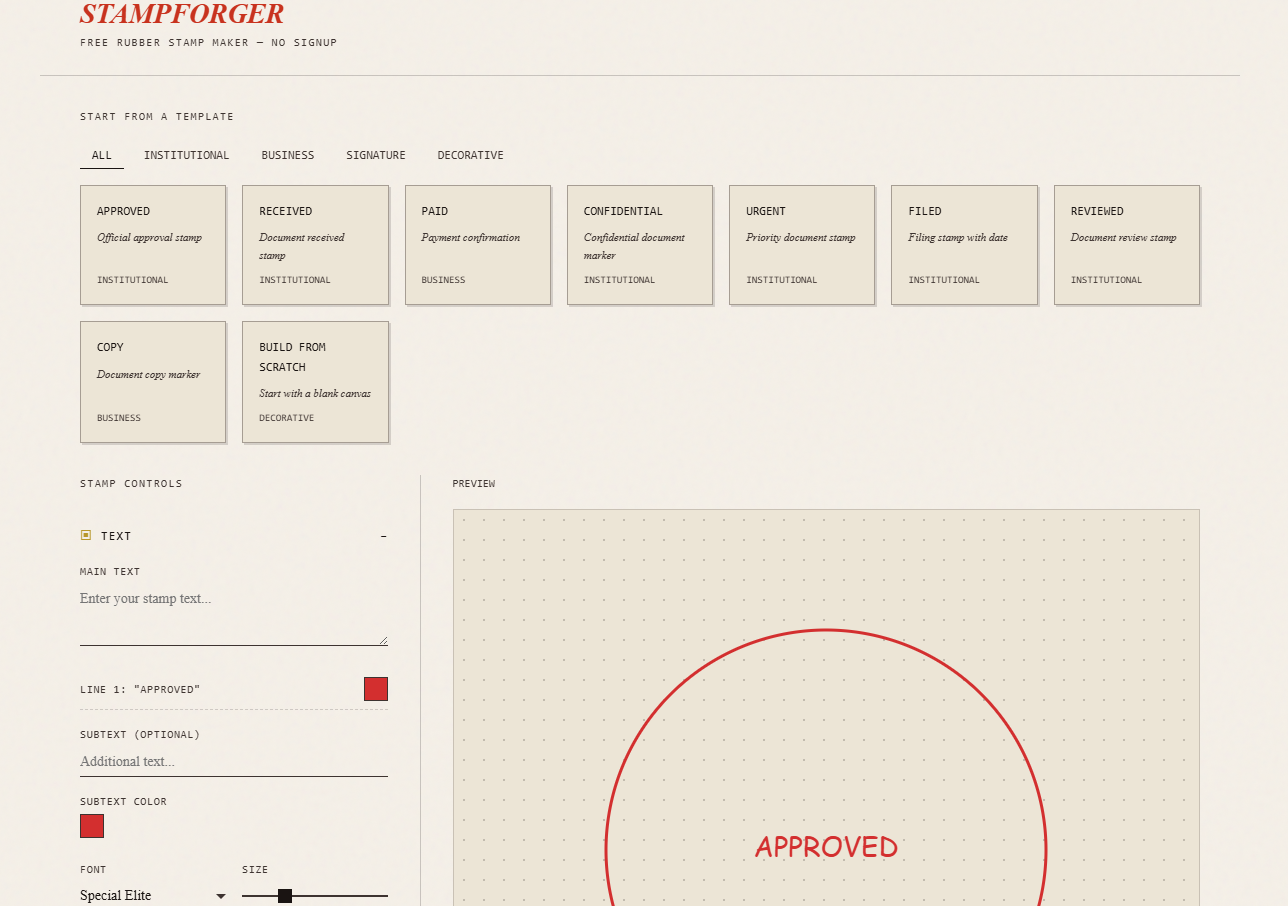
Why Use Stampforger?
Stampforger is an open, client-side web application built specifically for quick, professional stamp generation.
Key Highlights:
- 100% Free & No Registration: Start designing immediately without creating an account or providing an email address.
- No Watermarks: Download high-resolution PNGs and SVGs without artificial branding overlay.
- Complete Privacy: All canvas rendering occurs client-side inside your browser. No design data or document details are sent to any external server.
- Vector & Transparent Exports: Download transparent PNG files for digital PDF stamping or vector SVG files for physical stamp manufacturing.
- Authentic Distressing Simulation: Real-time ink bleed and edge roughness algorithms recreate the look of genuine physical rubber stamping on paper.
Key Features at a Glance
| Feature | Capabilities |
|---|---|
| Templates | 15+ pre-configured templates across Institutional, Business, Signature, and Decorative styles (Browse Templates). |
| Borders & Shapes | Stackable multi-layer borders: Circular, Oval, Square, Rectangle, Rounded Rectangle, Double Circle, and Decorative Dot Rings. |
| Curved & Arc Text | Top/Bottom arcs, split hemisphere mode with custom separators ($\star$, $\bullet$, $\blacklozenge$, $\blacksquare$, $\blacktriangle$), radial/upright text alignment. |
| Date Stamping | Integrated Date Stamp Generator supporting 5 international date formats and custom pickers. |
| Typography | Authentic stamp fonts including Special Elite, Courier Prime, Outfit, Arial, Times New Roman, Georgia, and Impact. |
| Ink & Texture | Realistic over-inked spread sliders, edge roughness/distressing, opacity adjustments, and custom color palettes. |
Step-by-Step Tutorial: How to Make a Custom Stamp
Step 1: Choose a Starting Point
Navigate to stampforger.com. You can either begin with a blank canvas by clicking Build from Scratch or pick a pre-made template from the Template Gallery.
Popular templates include:
- APPROVED / REVIEWED / FILED: Double-circle or rectangular institutional stamps with integrated date fields.
- PAID / CONFIDENTIAL: High-impact business stamps featuring checkmark icons or bold border weights.
- RECEIVED: Multi-line incoming document tracking stamps.
[ Template Gallery ] ──► [ Customize Text & Border ] ──► [ Apply Ink Effects ] ──► [ Export PNG / SVG ]Step 2: Configure Main Text and Typography
In the Text & Typography control panel:
- Enter Your Text: Type your primary message (e.g.,
ACME CORP,OFFICIAL SEAL, orCOPY). You can add multiple text lines, each with independent color settings. - Select a Font: Choose vintage typewriter/stamp fonts like Special Elite or Courier Prime for authentic grunge aesthetics, or Outfit / Arial for crisp modern corporate seals.
- Adjust Size & Weight: Use the font size slider (12px – 72px) and simulated text thickness slider (Thin to Ultra Black) to match your desired visual balance.
Step 3: Add Curved Arc Text & Hemisphere Separators
For round or oval stamps, curved text creates a classic official seal appearance.
- Enable Curved Text: Switch on the curved text toggle in the panel.
- Split Hemisphere Mode: Choose split mode to specify distinct top (Northern) and bottom (Southern) text strings (e.g.,
DEPARTMENT OF FINANCEon top andVERIFIEDon the bottom). - Set Separators: Place decorative symbols between top and bottom text arcs, such as stars ($\star$), dots ($\bullet$), or diamonds ($\blacklozenge$).
- Orientation Controls: Choose whether bottom text reads radially (outward) or upright for maximum readability.
Step 4: Layer Custom Borders and Frames
Stampforger supports unlimited stacked border layers, giving you full creative control over frame styling:
- Add Border Layers: Click + Add Border Layer to stack multiple shapes (e.g., an outer thick circle paired with an inner thin circle).
- Select Shape & Size: Choose from Circular, Oval, Square, Rectangle, Rounded Rectangle, or Decorative Dot Rings.
- Customize Stroke & Radius: Adjust line weight (1px – 10px) and scale percentage (50% – 150%).
- Decorative Dot Patterns: Add a dot ring border layer to customize dot size, spacing intervals, and color for ornamental badges.
Step 5: Embed Dynamic Dates & Icons
Adding an authentic date line or icon reinforces document validity:
- Dynamic Date Stamps: Enable the date module in the Date Stamp Generator section. Choose from 5 standard formats (such as
MMM DD YYYYorYYYY-MM-DD). Pick today’s date automatically or specify a custom historical/future date. - Center Icons: Place built-in icons such as Star, Checkmark, Arrow, Seal, or Crown directly at the core of your stamp.
- Stamp Rotation: Apply a slight tilt (e.g., $-4^\circ$ to $+6^\circ$) to simulate a natural hand-stamped angle on paper.
Step 6: Fine-Tune Realistic Ink & Texture Effects
Real physical rubber stamps rarely leave a perfectly uniform digital print. Stampforger includes advanced procedural texture controls to replicate physical ink behavior:
- Over-Inked (Ink Spread): Simulates wet ink bleeding into paper fibers, widening lines slightly.
- Edge Roughness & Grunge: Simulates imperfect pressure, worn rubber edges, and paper tooth texture.
- Opacity & Color: Select traditional stamp colors like Classic Red (
#D32F2F), Navy Blue (#1976D2), Forest Green (#388E3C), or Black (#212121), or enter any custom hex code.
Step 7: Export Your Stamp (PNG or SVG)
Once your stamp design is complete, export your asset with a single click:
- PNG Export (Transparent Background): Ideal for inserting into digital PDF documents (Adobe Acrobat, Preview), Word documents, email signatures, or web applications.
- SVG Export (Scalable Vector): Essential for sending vector paths to physical rubber stamp manufacturers, laser engravers, or high-resolution print production.
Best Practices for Creating Professional Stamps
- Keep Contrast High: Darker ink colors (deep red, dark blue, solid black) produce cleaner results when overlaid on white or light-colored document backgrounds.
- Balance Text Density: Avoid crowding circular arcs; use letter-spacing sliders to ensure smooth legibility around the circle curve.
- Use Subtle Distressing: For digital signatures or formal invoices, keep edge roughness low (10%–25%) for a polished yet realistic look.
- Leverage Vector Files for Physical Production: If ordering a physical self-inking or wood-handle stamp from a local manufacturer, export in SVG format to preserve crisp line geometry.
Frequently Asked Questions (FAQ)
Is Stampforger completely free to use?
Yes. Stampforger is 100% free with no hidden fees, paid tiers, or export watermarks. For more information on usage and capabilities, visit the Stampforger FAQ.
Can I use the generated stamps for commercial purposes?
Yes. All stamps generated using Stampforger are your own creation and can be used freely for personal, business, or commercial applications.
How do I insert my exported stamp into a PDF?
Download your stamp as a transparent PNG. Open your PDF reader (such as Adobe Acrobat or Mac Preview), select the Add Image or Stamp tool, and place the PNG file on your document page.
Conclusion
Whether you need a quick APPROVED mark for an urgent PDF approval, a decorative seal for custom packaging, or vector artwork for physical stamp manufacturing, Stampforger offers a fast, private, and powerful browser-based solution.
Start designing your custom rubber stamp today at stampforger.com!